Showing posts with label Software. Show all posts

Wednesday, February 9, 2011

Elektor Electronic Toolbox HD - iPad Edition v3.05.07

Elektor Electronic Toolbox HD - iPad Edition v3.05.07 | Read more...
Description
Elektor Electronic Toolbox combines electronic reference material with calculation and conversion tools in one handy app. Whether a professional or hobbyist, the app gives users a collection of the most important electrical information right at their fingertips.

PLEASE NOTE: The App supports the following languages: English, French, German, Italian, Netherlands, Spanish and runs on all devices from iPod Touch, iPhone 2,3G,3GS,4 and iPad from iOS 3.1.2 to iOS 4.x. Both Apps (iPhone and HD) are now identical so there is no need to buy the other version if you already have one.

Elektor Electronic Toolbox combines 28 different categories, all with a consistent look and feel. Categories include:

• Type listings (with color coding) for Resistors including SMD types and Capacitors
• Databases for Transistors, FETs, Triacs, Thyristors, Diodes and ICs
• Calculating circuit values for Resistor, Capacitor, Coil, and Filter circuits
• An Ohms Law calculator
• Unit conversion for numerous types of Measurements (pressure, energy, distance, speed, weight, etc.)
• A database for common electrical Symbols
• An Indices database of common electrical components
• Calculation of voltage regulators with 78xx,79xx,LM317 or LM337
• NE555 circuit design
• Op-amp circuit calculation
• Number base converter (Hex, decimal, binary etc.)
• Frequency, period wave-length calculation
• LED / resistor calculation
• Voltage divider calculation
• R/L calculations
• BJT calculations
• Schematic Diagrams
• Pinouts of Audio, Video, Computer or phone sockets

With many of the categories, input values can be entered with unit levels included (m, k, μ, etc.), providing automatic conversion to the appropriate value. The app provides visual displays of the circuits and components being used, further simplifying its use. An enormous database is also included with information for over 15000 transistors, ICs, diagrams, and component specifications, all available without an Internet connection.

Database examples:

• The transistor, FET, Triac, Thyristor und Diodes database contains over 45000 types and a full text search is available to find and compare types
• The transistor database includes data such as NPN/PNP, silicon/germanium, Ptot, Vcbo, Icmax, etc.
• Diagrams are provided for transistor housings, indicating base, collector, and emitter terminals
• The IC database contains the most common 4000 CMOS and 7400 TTL series types, including connection diagrams and functional descriptions (NAND gate, Schmitt trigger, etc.)
• The Indices database offers international names and specifications of batteries, coaxial cables, conductive substances, and various frequencies

At this point, many thanks for the ideas and suggestions we have received from the huge user community. We are happy that most of these suggestions could have been implemented over the time. We still looking forward to all additional ideas, suggestions or even criticism so that we are happy to continuously improve this App.

What is new?
- An issue with iOS 3.1.x that has caused the Icons to be displayed wrong (way too large) was fixed.
- The problem, that not all languages could be selected on iPad in Landscape mode was fixed.
- Additional changes and additions.

Requirement: Compatible with iPhone, iPod touch, and iPad. Requires iOS 3.1.2 or later

Monday, February 7, 2011

Speedcams v3.2

Speedcams v3.2 | Read more...
Description
Safe yourself a speeding ticket!

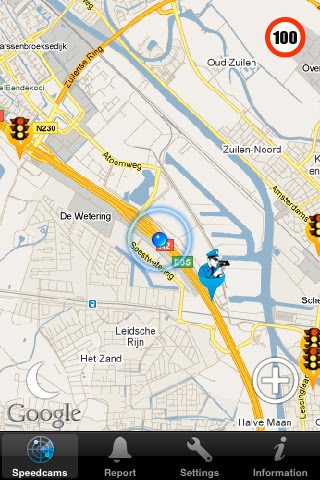
Meet Speedcams an application that makes you aware of the location of a speed cams and/or speed traps in your proximity.

There's nothing worse than having a relaxing drive and not noticing you've been driving slightly too fast, just to be treated to a fine a few weeks later! By using GPS positioning Speedcams will give you a signal when you need to watch your speed, because of an upcoming speed cam or speed trap.

As of version 3.0 you have the possibility of receiving PUSH messages for live speed traps, based on a selection of roads or routes you've made. Routes can pass through multiple countries and are not limited by freeways only, ALL roads (including those within cities) will be reported through PUSH! It's entirely up to you to decided on which days and at what times you want to receive PUSH messages, this is definable per road/route. As an example you could setup a work-home route that will only send you PUSH messages during workdays on times that you're typically on the road!

Our database has over 20.000 speedcams located throughout Europe and hundreds of speed traps reported WORLDWIDE every day by our users!

What is new?
-Dutch radar list added in separate tab.

Requirement: Compatible with iPhone, iPod touch, and iPad. Requires iOS 3.0 or later

Inside Trader 3

Inside Trader 3 | Read more...
Description
You have $1000 and 30 days - can you turn it into millions?

The update you've been waiting for, Inside Trader 3 is the next iteration in the massively fun turn-based trading game that's been salvaging boring meetings and tireless lectures for thousands of players!

Inspired by turn-based traders like the classic Dope Wars and Space Traders type games, Inside Trader presents you with a portfolio of securities to test your skills against. You've got a man on the inside, but the SEC takes notice when you take his advice - and if they get too close, you'll get busted!

What is new?
- More Stocks!
- World-wide Leaderboards!
- Achievements!
- Faster gameplay!
- Easier buying and selling!
- Open Feint integration - play against your friends!

Requirement: Compatible with iPhone, iPod touch, and iPad. Requires iOS 3.1.3 or later

Sunday, February 6, 2011

Walk​meter GPS Walking Stopwatch for Fitness and Weight Loss v5.0

Walk​meter GPS Walking Stopwatch for Fitness and Weight Loss v5.0 | Read more...
Description
Walkmeter turns your iPhone into a powerful GPS stopwatch, giving you feedback and motivation to go farther, be healthier, and live longer. ➤ Supports iOS 4 and multitasking! ➤ Named Best of Show at Macworld 2010 by Beatweek. ➤ Featured by Apple in What's Hot in the App Store. ➤ For a product tour, see www.walkmeter.com.

Note: Does not support iPod touch or first-generation iPhone, which lack GPS capabilities.

POWERED ENTIRELY BY YOUR IPHONE 3G, IPHONE 3GS, OR IPHONE 4
Walkmeter is an iPhone-centric solution for tracking your workouts on your iPhone. It can be used for walking, running, cycling, skiing, skating, and more.

TRACK
Walkmeter continually records your time, location, distance, elevation, and speed - years of workouts only take up the space of a few songs. Stop and start recording on-screen or with your earphone remote.

VISUALIZE
See your results on maps, graphs, and a calendar, and organized by routes and activities. Summarize your statistics by day, week, month, year, and overall.

HEAR
Monitor your progress with up to 25 configurable announcements including distance, time, speed, elevation, and more. Announcements may be heard automatically at time or distance intervals, or on-demand with your earphone remote. High quality voices may be downloaded through In App Purchase for hearing replies from Twitter, Facebook, and dailymile.

RACE
Compete against your previous workouts along a route, or import and compete against other people's workouts. See your virtual competition on a map and in graphs. Hear announcements of how far you are ahead of or behind your competition.

SHARE
Use Facebook, Twitter, dailymile, and email to share Google Maps of your workouts, automatically updated every few minutes. Have emails automatically sent to keep family and friends notified of your location and progress. During your workout, hear replies from family, coaches, and friends spoken using text-to-speech technology. (Requires In App Purchase.)

IMPORT/EXPORT
Import a route or virtual competitor by simply clicking on a GPX or KML link or file in Mail or Safari. Export complete summaries of your workouts, or detailed CSV, GPX, or KML files for use in maps, graphs, or social fitness sites.

FOR WALKING, RUNNING, CYCLING, SKIING, SKATING AND MORE
Walkmeter, Runmeter, and Cyclemeter, and are built from the same core foundation, but come preconfigured for walking, running, or cycling, respectively. Each supports all features and activities.

IMPROVE
Walkmeter gives you the data that helps you achieve your goals, whether it's to walk a block or a march, run a mile or a marathon, or cycle a park or a century.

TOP 10 REASONS TO CHOOSE WALKMETER
➤ Remote control using your earphone remote keeps you from fumbling with your iPhone at the start and finish.
➤ Automatic stop detection removes stopped time from your statistics.
➤ All of your workouts may be viewed by route or on a calendar, and summarized by day, week, month, year, and overall.
➤ Import allows you to preload routes, or import other people's workouts to compete against.
➤ Export allows you to save detail and summary information in CSV, GPX, and KML formats.
➤ Ghost racing lets you compete against your best, median, and worst workouts, or against imported competitors.
➤ Twitter, Facebook, dailymile, and email updates enable your friends to view your progress.
➤ Google Maps are updated every few minutes to keep your friends and family informed of your location.
➤ Spoken comments from your friends on Twitter, Facebook, and dailymile encourage you during workouts. (Requires In App Purchase.)
➤ With 5 major updates in the past year, we're working continuously to improve the application.

What is new?
Massive update: high quality voices, import, virtual competition, dailymile integration, configurable stopwatch, and more.

HIGH QUALITY VOICES
➤ A new built-in voice speaks your announcements without the need for purchased voices.
➤ Includes a professional text-to-speech engine, replacing our prior engine. (We heard your feedback!)
➤ Purchased voices are now required to speak replies from Twitter, Facebook, and dailymile.
➤ Voices are available through In App Purchase at a low price.
➤ Many voices are available, both male and female, with more to come. See More > Settings > Voices.

IMPORT
➤ To import, tap a GPX or KML link or file attachment in Mail or Safari.
➤ Import the official path for a route, so you can see where you are going on the map and elevation graph.
➤ Import your previously recorded workouts from other social fitness sites and devices, so you can include them in your workout history.

VIRTUAL COMPETITION
➤ Import a workout as a virtual competitor, so you can hear announcements of how far you are ahead or behind, and see their location on the map and graphs.
➤ Every map and email that you share includes an import link so that it can be imported.
➤ Added a leaderboard to every route. See how your most recent workout compares to your competitors, as well as your best, median, and worst workouts for that route.

DAILYMILE INTEGRATION
➤ Login to post your workouts to dailymile.com, a rapidly growing community of 200,000 members who have logged more than 20 million miles while running, biking, and walking.
➤ Updates your workout every few minutes with dailymile, optionally including a map link to your location and stats.
➤ Speaks replies from friends on dailymile during your workout for encouragement.
➤ You can add comments on your workout and on the replies from friends, during and after your workout.

AND MORE
➤ Each of the six stopwatch displays can be configured to show one of 40 different statistics by tapping on the settings icon on the stopwatch.
➤ Added the ability to enter notes before or during a workout by tapping on the notes icon on the stopwatch.
➤ Improved responsiveness of speed and pace displays.
➤ Added official distances and times that can be set for each route.
➤ Added the ability to set the default route. See More > Settings > Stopwatch.
➤ Added split pace / speed announcement type. See More > Announcements.
➤ Added support for descent, kilojoules, and grade.
➤ Updated to the latest Facebook integration library to fix unrequested log outs.
➤ Fixed issue that caused iPod volume to stay lowered.
➤ Improved cycling calorie calculations.
➤ Changed GPX export to create segments between stops.

Requirement: Compatible with iPhone, iPod touch, and iPad. Requires iOS 3.0 or later

Ambient Mood Flashlight v1.0

Ambient Mood Flashlight v1.0 | Read more...
Description
Select an atmospheres, turn off the lights and enjoy. Amazing graphics, color animations and soft music will take you to the mood you seek.
Ambiance Mood Flashlight is a soft, engaging, interactive display of fabulous colors, shapes and objects in a wide variety of environments. Enjoy by yourself or with your loved ones. Enjoy it yourself or give it to your babies and kids. Ambiance Mood Flashlight is an experience to enjoy and remember.
Great for falling asleep, great for changing your mood to the better, Mood Flashlight is here for you . . .

How to use:
* Select one of the moods to activate
* Press moving items on screen for special effects
* Shake to change mood

What is new?
- Photo will be saved to your photo library

Requirement: Compatible with iPhone, iPod touch, and iPad. Requires iOS 3.0 or later

Save Your Moment v2.1

Save Your Moment v2.1 | Read more...
Description
Do you remember all your precious memories? Save your moment provides you with a simple and unique way to capture your best moments. With Save your moment, you can put your photos anywhere on the screen and attach notes to describe them.

Keep it simple. Put your moment is a suitable application to keep your highlight moments through notes and photos. You can easily put your moments into this mobile application with only a simple touch.

* Magic sticker
Like a sticker, you can easily insert your photos with only a simple touch! Of course you can rotate them with a handle, and magnify them with multi touch function.

* Manage your moment with tag
You can organize your memories with simple tag function. You can add up to five tags. Moreover, when you save your moments your tag tree will grow. As you write more you can see how your tag tree is growing and changing.

* Simple lock
We offer security lock function to keep your memories safe. You can save them with a four digit number to protect them. Even in multitasking mode simple lock function works to protect your secret!

What is new?
- Photo will be saved to your photo library

Requirement: Compatible with iPhone, iPod touch, and iPad. Requires iOS 3.1.3 or later

Gay Kama Sutra v1.2

Gay Kama Sutra v1.2 | Read more...
Description
The most comprehensive sex position guide for homosexual men on the app store! YOU'D BE MAD TO BUY ANY OTHER GAY SEX APP!

Tons of gay positions for you to try out! THIS APP includes the following features:-

√ Sex position game!
√ Ambient Videos
√ Loads of gay sex positions, OVER 60!
√ Full instructions for each position!
√ Difficulty ratings
√ Average calories burnt for each position
√ Quote Databases
√ Gay love dice!

What is new?
- Bug fixes etc

Requirement: Compatible with iPhone, iPod touch, and iPad. Requires iOS 3.1.3 or later

weCal II v2.06

weCal II v2.06 | Read more...
Description
weCal II uses the Apple iPhone Calendar data and integration options. With weCal II, appointments from the calendars in the Calendar App can be shown and edited.

Advantages of weCal II over weCal are:
- all integration options of the iPhone / iPod Touch Calendar can be used
- no subscription necessary to import- and export data (no need to use the weCal server)

You might still prefer weCal over weCal II if:
- you are not on iOS 4 or better
- you like the way the weCal server always keeps a backup of your calendar data over-the-air
- you like the invitation infrastructure of weCal

Calendar integration includes support for:
- Microsoft Exchange
- MobileMe
- Google
- Yahoo
- CalDAV
- ICS calendar subscription

Unique features of weCal II are:

- use a swipe gesture on any day in the month view to change to the previous or next month
- switch between am / pm colors or calendar colors in the 24 hour dials in the month view
- select sunday or monday to show as the first day of the week in the month view
- the default week number scheme can be switched to ISO 8601
- jump to any date directly using the month label / button at the center top of the month view
- shake your iDevice to select the current date in the month view
- rotate the month view to landscape to get a week overview
- show the previous or next week with a swipe gesture in the week view
- collapse the month view to get a graphical day view
- show the previous or next day with a swipe gesture in the day view
- use the Today button to jump to the current date and toggle the collapsed state of the month / day view
- double tap in the day view to create an appointment
- workday hours are highlighted in the day view
- the start and end of a workday can be selected
- display appointments in a list of all entries in the last, previous and next month
- filter appointments in the list to match search criteria
- all appointment details can be edited in a single view
- numerous repeat and alarm options
- calendar entry details can be edited in portrait or landscape, featuring the bigger keyboard
- phone numbers, urls and email addresses in the notes field can be tapped and used
- selected contacts can be invited even without MobileMe or Exchange
- contact details of attendees can be used to directly send text/email messages or make a call
- ICS files can be imported from Mail or Safari to create a new appointment or update the invitation status
- choose one of 10 themes to customize how your calendar looks

What is new?
- The new Copy option also copies changes made to the appointment
- All day appointments crossing a daylight saving change sometimes did not show on the correct day
- Invitation response / status handling improvements

Requirement: Compatible with iPhone, iPod touch, and iPad. Requires iOS 4.0 or later.

Thursday, January 27, 2011

Math Quiz v1.0.1

Math Quiz v1.0.1 | Read more...
Description
Math Quiz has over 4,000 Math questions. By doing test you will improve your math skills and not make mistakes when using them in day to day activities

Preform a quiz with a set number of questions or a time trial quiz where you need to answer as many questions in a certain amount of time. Challenge yourself with sudden death mode where your quiz will end if you select the wrong answer

Review your old quizzes so you can see where you made mistakes and learn for next time.

Compete against your friends and check your scores on the leader board.

What's new

Requirement: Compatible with iPhone, iPod touch, and iPad. Requires iOS 3.0 or later

Fyllehund v1.1

Fyllehund v1.1 | Read more...
Description
With Fyllehund you can keep track of what you drink, at the pub or on the party.

Enter what you drink, during the evening, with just two taps. Fyllehund shows BAC and time left until the alcohol has left your body.

IMPORTANT! Fyllehund must not be used to decide whether you can drive or do other tasks which requires sobriety.

What's new
- Optimizations
- Added analytics to help improve the app

Requirement: Compatible with iPhone, iPod touch, and iPad. Requires iOS 3.0 or later

3D Photo v1.01

3D Photo v1.01 | Read more...
Description
Turn your photos into digital cubism with 3D Photo!

3D Photo transforms friends and landscapes into beautiful, abstract geometric shapes.

Experiment with digital photography from a cubist approach and see the world around you change into fascinating and fragmented works of art.
Simply choose a 3D template and swipe to see your photo from multiple angles. Take a photo, drag to rotate your viewpoint, and then take a photo again!
Discover new ways of seeing your world, as everyday objects are transformed into beautiful colors, textures and patterns.

Instantly share your 3D Photos with your friends! Just email, tweet or post to Facebook and Flickr.


Features:
Stunning graphics
Live preview of the effects
Experiment with 15 different 3D templates
Add effects from simple shapes like spheres and rectangles, to multi-faceted geometric patterns
Take a photo or choose one from your library
Share via Email, Facebook, Twitter, Flickr or save to your Camera Roll
And much more...

Simple touch screen controls:
Swap 3D templates by tapping on arrows
Drag to rotate the viewport and see your photo change
Drag photos in your gallery for different perspectives

What's new
- Optimizations
- Added analytics to help improve the app

Requirement: Compatible with iPhone, iPod touch, and iPad. Requires iOS 3.0 or later

Thursday, January 13, 2011

SexTester v1.2


SexTester v1.2 | Read more....
Description
Are you missing the sounds of moaning during sex?
Fantastic abs, Schwarzenegger-like hot body, Beckam-like handsome face ...
NO. Stamina is everything!

Sex_Tester helps you to develop your hidden power for satisfying your lover.

For men:
- Is it hard for you to exert control?
- Do you have any relationship stress?
- Are you wondering why you are tired so early?
- You feels your clock is very slow during sex?
- Your girl is sleeping during making love?

So are you afraid your girl would dump you?
Just measure your sextamina every time. See your improvement everyday. Everyone can be a horse!

Oh, you are already a horse?
Aren't you wondering why every girl loves you sooooo much?
It will show you an answer!


For girls:
- You just found that your new kind, rich, handsome guy is useless?
- You are about to hate your guy?
- Do you regret your marriage?
- You think that your boyfriend is very selfish?

So are you preparing to dump your guy? Wait! You can save him.
Just measure your partner's sextamina and show it to him.
Everyone can be a lifesaver.

Oh, your guy is already a horse?
Prize out of his secret! Very simple!

What's new in Version 1.2
- Password Lock
- History Clear
- Assistant for Your Long Love
- Minor Bug Fixes

Requirement: Compatible with iPhone, iPod touch, and iPad. Requires iOS 3.1.2 or later
Thief Alert : Burglar Alarm v3.1

Thief Alert : Burglar Alarm v3.1 | Read more...
Description
Thief Alert alerts you if someone is trying to steal your iPhone. Before you leave your desk / cube at work, just enable the Thief Alert app, and if anyone lifts or tries to steal your iPhone, it immediately detects the movement and the alarm goes off.

YOUTUBE VIDEO DEMO:
http://www.youtube.com/watch?v=PzFiugngNVE

IMP: IPOD TOUCH WITHOUT SPEAKERS WILL NOT WORK !

This not only surprises the person who is trying to steal it, but also alerts nearby people. Just like a car alarm. If you are nearby, you can run back at the alarm. The Thief Alert app uses the inbuilt accelerometer to detect movement and the alarm goes off for 5 seconds EVERY TIME it detects significant movement.

NOW PRESSING HOME WILL NOT STOP THE APP. Every few seconds, the alarm sound will play till you DE-ACTIVATE ALARM WITH SECRET PASSCODE which only you will know.


NOW SET ANY PICTURE from your picture gallery as the background ! Alternatively choose from a preselected set of background images.

A nice deterrent for sure and definitely worth a try ! If you like it, tell everyone. If you do not like it, please tell us and we will include your feedback in our next update.


Few points:
1) The app disables auto-lock. So it will work even if the iPhone is left alone for a long time.

2) The alarm is 5 seconds by design. It is fired every time motion is detected. So if someone is lifting it and running away, it will continuously alert you.

3) Pressing the home button will NOT stop the app.

4) In the version 1.1 update, various settings were added.
a) Set a delay before the motion detection starts. So you get time to place your iPhone before the detection starts.

b) As the auto-lock is disabled at the start, few were concerned about the thief getting access to your data without the password lock. Now you can enable the feature where at the first alarm / movement detection, the idle timer is started again. So if your screen saver / auto lock was set to 1 minute, in a minute, the screen will lock (configured from iPhone settings). So by the time the thief gets to access your phone/ iPod, the password lock would kick in. (thanks for the review).

5) If technically possible and useful, requested features will be added in newer updates. So thank you once again for the support.

Thank you USA, France, Italy, Spain, UK, Australia, Canada, Japan for buying in high numbers !


Please contact info@nuvus.com if you have any suggestions.

What's new in Version 3.1
Bug fixes

Requirement: Compatible with iPhone, iPod touch, and iPad. Requires iOS 3.0 or later

Monday, December 20, 2010

VoiceKeyboard v2.0.1

VoiceKeyboard v2.0.1 | read more...
Description
Voicekeyboard is a musical keyboard that has flexible memory, allowing you to keep adding or removing your own recorded sounds in and out at any time. You are not stuck with the "stock" set of sounds that come with it. Just record the sound you want into it and play away! Record anything you think sounds good then turn it into something musical and creative.

For example, record and play:
- singing / vocals
- instruments
- animal sounds
- friends and coworkers
- sound FX
- sound clips from movies / music.


NEW FEATURES

• Web Sharing
Upload and download recorded samples to and from VoiceKeyboard with your home computer

• 30-Note Polyphony
Play complex 5-note chords, 30 high-quality uncompressed (48.0k 16 bit) samples can play concurrently.

• Sound Modes:
The Timeshifting (or Timestretching) option allows simultaneously played notes to be in sync and the same duration, making the samples sound harmonious and musical when played together.

• Automatic Sample Trimming
This version automatically recognizes and removes the silence or "dead air" at the beginning and end of the recorded sample, making the keyboard very responsive.

• Audio Normalization
Normalization increases the loudness of your recordings to a maximum level without introducing any new distortion.

• Sustain and Looping
Control how the recorded samples are looped and sustained, when played on the keyboard.

• Fully Animated Keyboard
• Save, Load, Preview, and Delete Samples
• Pattern Playback feature with tempo adjustment
• No Ads

Requirement: Compatible with iPhone and iPod touch (2nd generation). Requires iPhone OS 2.2.1 or later

Trip Cubby • Mileage Log v2.0.1

Trip Cubby • Mileage Log v2.0.1 | Read more...
Description
Trip Cubby is a polished, full featured app -- essential for anyone who needs to track mileage for tax deduction or reimbursement.

If you'd like to try Trip Cubby prior to purchase, Trip Cubby Lite is free and fully functional (limited to 5 records).

"Trip Cubby makes recording my trips simple and fun, and version 2 improves upon a winner... Trip Cubby is an app that I use and rely upon every day." Dave Caolo - tuaw.com

"This is the app everyone else was promising. App Cubby delivered." -Rusty640

"It has way more features than you could imagine and the support from the company is top notch" -sweetrock

After many failed attempts over the years at keeping a paper mileage log, we created Trip Cubby to take the time and tedium out of this money saving process. We designed Trip Cubby to be fast, clever, and above all, easy to use. With predictive input, auto-entry, auto-calculation, and quick access to frequent trips, Trip Cubby does the hard work for you. A few quick taps will create useful data ready to search, sort, and generate email reports.

Features:
• Designed with IRS compliance in mind
• Excel-compatible email reports (CSV attachment)
• Online sync/backup
• Easily sort, filter, and search trips
• Predictive text fields and data entry shortcuts
• Mass editing of records (Delete or Mark Paid)
• Frequent trips enable quick entry
• Data fields may be turned on/off in Settings
• Customizable tags make it easy to group trips
• Charts: Deduction Categories, Paid vs. Unpaid, Mileage
• Supports both miles and kilometers
• Customizable reimbursement rates
• Supports multiple drivers and vehicles
• Icon badge for incomplete trips
• Number Pad or Odometer style entry
• Custom deduction categories
• Swipe navigation of detail views
• If data entry is interrupted by a phone call, the data will be stored and retrieved on next launch

The App Cubby Team is dedicated to responsive development and support. If you have questions or criticism of our mileage tracker, please send us a note: bugz@tripcubby.com We may be able to fix your issue in less time than it would take to write a negative review!

What's new in Version 2.0.1
- Fixed bug in Contact field when there are contacts with information but no name
- Fixed issue with swapped Deduction Categories

Requirement: Compatible with iPhone and iPod touch. Requires iPhone OS 2.0 or later.

RealArtist v1.3

RealArtist v1.3 | Read more...
Description
With RealArtist you can add a smile to a photo and an even bigger smile to the person watching you do this.

Take a new photo or pick a photo from your photo library and nudge and tweak eyes, nose and lips and save your creations for later.

Use the multitouch gesture pinch on the mouth to shut somebody up or try the gesture zoom to really open his eyes.

What's new in Version 1.3
Compatibility with iPhone OS 3.0

Requirement: Compatible with iPhone and iPod touch. Requires iPhone OS 2.0 or later.

Sunday, December 19, 2010

Lady Biz (Period Calendar) v2.3


Lady Biz (Period Calendar) v2.3 | Read more...
Description
We’ve all been there, ladies. You make the trek to your doctor’s office to tend to your female health and he wants to know when your last period or Pap smear was. Try as you might, you can’t remember for sure whether it was before or after that week your mother came to visit. No wait, it was the day the new sofa arrived. You might even start ticking off the days on your fingers.

The good news is that you don’t have to do that, anymore. Save yourself the brain drain and embarrassment with this Lady Biz app.

Lady Biz is the perfect, portable solution for women on the go. Never again do you have to rack your brain trying to answer your doctor’s questions because you’ll have all the information recorded on your iPhone or iTouch device. Heck, you can even impress your doctor with easy viewing graphs, reports, lists and calendars.

There’s no worry about others seeing the personal information in your Lady Biz app. It’s password protected, so only you will know what’s in it.

What will Lady Biz help you keep track of for you? Tons of stuff!

• Breakouts
• Breast tenderness
• Cycle day
• Cramp intensity
• Exercise
• Intimacy
• Migraines
• OB/GYN checkups
• Period duration and intensity
• Pregnancy test results
• Sleep patterns
• Spotting
• Stressors
• Walking temperature for identifying ovulation dates
• Vitamin regime
• Weight changes
• Five additional customizable items

Lady Biz gives you a journal for making notes and can even predict your periods for the next 12 months. Imagine not having to worry about remembering these things. It’s all right there at your fingertips with this Lady Biz app.

So, come on ladies, what are you waiting for? This one has everything you’ll ever need.

What's new in Version 2.3
New: The wait is over, Lady Biz now has custom items! - Pick from up to five custom items to track. Edit the name and choose from eight colored icons. Each custom item can be a switch or slider. Now you can track what ever you want! These items work for reporting and charting, plus email export.
New: UI Change: Moved images to left side for the Calendar row output view.
New: UI Change: Settings is now a green color.

Feel free to contact us if you have feature requests or issues.

Visit our web site for a full list of features and a gallery of screen shots. Tell your friends about Lady Biz.

Did you know that Lady Biz has a passcode lock feature? You can protect your information by creating a 4-digit passcode.

** Note: Please do not delete your existing version of Lady Biz from your device before updating, as this will delete your stored data.

Requirement: Compatible with iPhone and iPod touch. Requires iPhone OS 3.0 or later.

Thursday, December 16, 2010

TextGuru - Edit and Share Documents v1.5

TextGuru - Edit and Share Documents v1.5 | Read more...
Description
TextGuru is an advanced, desktop class, multi-function text editor. No other app lets you get down to serious text editing like TextGuru does.

Features include:
- Cut, copy and paste
- Find and replace
- Autosave
- Read Microsoft Office ™ Documents (Word, Excel, Powerpoint) in both landscape and portait modes
- Read PDF Files in both landscape and portrait modes
- Integrated file sharing, visit our website for more details
- Search within the text of your entire document collection
- Pastebin support with Pastie and Sprunge
- Email entire documents or share pastebin links with anyone
- On-demand web preview of web documents
- Display documents in any of the 22 fonts available on the iPhone
- View binary files using either hex or ASCII representation

What's new in Version 1.5
Built-in FTP Client supporting both downloads and uploads
Built-in Web Downloader with Bookmark Support
Completely re-designed file browser with subdirectory support
A complete set of file management tools
Fresh new user interface
Multiple stability enhancements and speed improvements

Requirement: Compatible with iPhone and iPod touch. Requires iPhone OS 2.0 or later.

Twist & Tap v1.0

Twist & Tap v1.0 | Read more...
Description
What would you do if you're drinking with somebody and want to do something intimate? Try "Twist and Tap".
You tap the target with your finger then your friend tap another. But in the end someone has to give up. You may think your fingers twisted but you two must be friendlier.

What's new in Version 1.0
- Fixed the bug that crashes when the user taps screen after launched.
- Changed some messages.
- Removed the settings from application.
- Added app's preferences into the "Settings" system application.

Requirement: Compatible with iPhone and iPod touch. Requires iPhone OS 2.0 or later.

Monday, December 6, 2010

My Writing Spot v1.8.4

My Writing Spot v1.8.4 | Read more...
Description
For the price of a cup of coffee, you can have the ability to work on your novel from anywhere. Write whenever you have a spare minute. Your manuscript is only a tap away!
*** Be sure to check out the My Writing Spot for iPad app as well ***

Working on a novel or other writing project from multiple computers is a hassle. My Writing Spot makes it easy. It works well as a standalone app, but really shines when coupled with the excellent free web app of the same name - keeping your documents in synch painlessly.

FEATURES:
✭ Write in portrait or landscape. Unleash those thumbs!
✭ Autosave
✭ Word/Character Count
✭ Dictionary/Thesaurus lookup
✭ Email Documents
✭ Synchs easily with the free My Writing Spot web app so you don't need to worry about document management. You can have the latest version of your docs with you all the time.

Perfect for NaNoWriMo! The word count feature lets you know exactly where you stand. If you're out and about and have a few minutes to spare, you can dash off a few hundred words. Give your daily word quota a boost!

My Writing Spot is also handy for keeping track of To-Do lists and notes. Struck with an idea while you're away from your computer? Capture it in My Writing Spot! Since you can have as many documents as you'd like, the possibilities are limited only by your imagination.

Requirement: Compatible with iPhone, iPod touch, and iPad. Requires iOS 3.0 or later