Showing posts with label Wirelest. Show all posts

Tuesday, November 9, 2010

ZOOZ Control Pro v1.0

ZOOZ Control Pro v1.0 | Read more...
Description
ZOOZ Control Pro transforms your phone into a wireless gesture-base controller for your PC games.

With ZOOZ Control free host application (www.zoozcontrol.com) running on your PC, ZooZ Control Pro will transform your iPhone/iPod Touch into a gesture driven game controller for your PC games.

Create new presets for your favorite games. Map gestures, buttons, sliders and the pointer to game commands and functions. Enter explanatory text, which will automatically appear on your iPhone/iPod Touch.

You can then move your phone to control the game or use the on-screen buttons, sliders, and pointers. Feel your phone vibrate in your hand in response to the game.

ZOOZ Control Features:
* Automatic WIFI connectivity
* Motion sensing
* Remote joystick, keyboard and mouse control
* Force Feedback (iPhone only)

In addition to selecting between two pre-programed game presets (Microsoft Flight Simulator X and Need For Speed: ProStreet) ZooZ Control Pro allows to create, save and edit an unlimited number of customizable game presets!

Requirements:
* Windows XP/Vista (32-bit)
* WIFI router

Requirement: Compatible with iPhone and iPod touch. Requires iPhone OS 2.1 or later.

Thursday, August 12, 2010

Air Photo Wifi Printing v1.2.1

Air Photo Wifi Printing v1.2.1 | Read more...
Description
Winner of 2009 iLounge 100 Essential iPhone Apps! http://www.ilounge.com/2010bg

Air Photo enables easy and fast wireless photo printing to any printer on the local Wifi network.

Simply run Air Photo, browse to the photos you like to print, and tap "Print".

Air Photo Server (free) must be installed and running on the desktop computer. (Note, please make sure it is added to the exception list of your firewall). Download it at:

http://www.sudobility.com/Air.Photo.html

Key features and benefits:

1. Auto-rotation. You don't need to configure whether you want to print landscape or portrait.
2. Scaling options - crop or white space.
3. Printer is configured with Air Photo Server, with complete control. The printer settings are persistent.
4. Simple and seamless interface. Single tap to print.
5. Auto connect if only one Air Photo Server running on the network. If multiple are running, choose which one to connect to.
6. Compatible with all wifi environments.
7. Compatible with all printers.
8. Air Photo Sever compatible with both Mac (Leopard, PowerPC or Intel) and Windows (XP/Vista, 32-bit or 64-bit).
9. Server has the option to save all the received photos.

Load up on the photo paper. You will need it.

What's new in Version 1.2.1
- Fixed a memory leak while printing.

Requirement: Compatible with iPhone and iPod touch. Requires iPhone OS 2.0 or later.

Monday, August 9, 2010

AutoWiFi v1.0.124

AutoWiFi v1.0.124 | Read more...
Description
AutoWiFi logs on your iPhone or iPod Touch automatically to Wi-Fi hotspots by saving your username and password and sending it to the hotspot provider when needed. No more remembering and retyping your username and password every time: just launch AutoWiFi and you're connected. It replaces the built in system and works with many hotspots that the built in system does not work with.

--- Important Note ---
Please use OS 3.1 or OS 2.X for full AutoWiFi compatibility.
---

Not sure if AutoWiFi is the right App for you? Try AutoWiFi Lite free of charge first (available in the App Store).

By using an advanced learning system AutoWiFi works with most web authenticated hotspots out of the box so you don't have to send us information on the hotspot for us to add it to a database. Simply launch AutoWiFi and log in once by following the "add network" instructions. AutoWiFi learns what to do to connect and will automatically connect you in future without you having to reenter your data: quick, clean and easy.

Feature List:
* Automatically logs you on to your web authenticated hotspots (public WiFi hotspots such as universities, hotels, restaurants, cafes)
* Advanced learning system can learn to connect to hotspots without sending us information about them first
* Store as many WLAN hotspots as you want to
* No need to wait for us to update a database in case a hotspot changes its connection profile: just let AutoWiFi relearn it
* Zero-Touch reconnecting: once AutoWiFi knows your network you only need to launch the app, no further clicks are needed to log on
* Very easy to use

Current Limitations:
* iPhone OS 3.0 problems, use OS 2.x or 3.1 instead
* Will not work on hotspots where you have to enter your username and password on the first page and accept a license agreement on a second page
* Networks that need an sms to connect (e.g. the AT&T network) will not work

Getting Started:
1) Go to the hotspot you wish to use and add it to the iPhone's known hotspots (launch Settings and press WiFi).
2) Instead of launching Safari to enter your user name and password, launch AutoWiFi instead.
3) AutoWiFi will offer you an Add Network button. Click it and follow the instructions to teach AutoWiFi to connect.
4) Next time you need to log in to this hotspot just launch AutoWiFi and it will automatically re-authenticate you. You no longer need to retype your username and password every time.

What's new in Version 1.0.124
-Support for networks with percent signs in usernames or passwords (e.g. Queens University)
- Improved support for networks with challenge data (e.g. neuf.fr)

Requirement: Compatible with iPhone and iPod touch. Requires iPhone OS 2.2.1 or later.

Saturday, July 24, 2010

WifiTrak (Find FREE WiFi) v2.6

WifiTrak (Find FREE WiFi) v2.6 | Read more...
Description
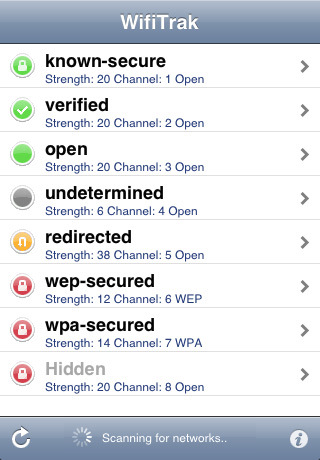
WifiTrak helps you find FREE and open WiFi hotspots and public access points quickly and easily.

WifiTrak scans for all available WiFi devices and networks in the area and tests each network it finds for usability. It shows a list of the Wifi networks sorted from most useable (open, not redirected, strongest signal) to least useable (secured or hidden, weak signal). It can automatically notify and launch mail, a browser, or another application when it finds a suitable network.

FEATURES
* Simple, standard user interface
* Network list sorted from best to worst
* Automatic redirection detection
* Automatic scanner/adjustable scan time
* Ability to set minimum strength
* Choice of notification sounds
* Optional automatic connection action:
Connect
Connect and exit
Connect and Launch Safari
Connect and Launch Mail
Connect and Launch URL
* Detail display with:
MAC Address
Channel
Signal Strength (RSSI)
Noise
Authentication (WEP/WPA/WPA2)

What's new in Version 2.6
3.0 Compatibility
Minor translation corrections

Thursday, April 29, 2010

ezShare 1.0

ezShare v1.0 | Download
Description
Documents at your fingertip anytime anywhere!

*From your iPhone/iPod touch, access files on your
- Home or Office computer (PC/MAC)
- MobileMe iDisk or other WebDav Servers
- Time Capsule / AirPort Extreme / NAS Servers
- Google Docs / Picasa
- Amazon S3
- SFTP, FTP Servers

*From your computer, access files on the iPhone/iPod touch
(commonly referred to as a WiFi drive in the App Store)

*From a Web Browser on your computer, view or transfer files to your iPhone/iPod touch

*From the Web Browser in ezShare, download files to your iPhone/iPod touch from the internet

CONNECTION
* Does not require any third-party software to be installed on your computer
* Works with WiFi, 3G, EDGE
* Supports CIFS/SMB, AFP, SFTP, FTP, NFS, WEBDAV (HTTP or HTTPS)

MUSIC/VIDEO
* Stream audio and video from your Computer or WebDav server (iDisk etc)
* Supports all standard iPhone formats

PDF VIEWER
* Custom viewing engine
- Password protected
- Large PDF files
* Don't want to download that large PDF file? You can also browse PDF files straight from your computer .

EMAIL
* Email files as attachments (up to 10 MB) from ezShare
* The files are not downloaded to your iPhone/iPod if they are on your computer, SFTP or WebDav servers

FILE MANAGEMENT
* Move/rename and organize your files
* Create and edit ASCII text files (less than 128KB only)

DOCUMENT VIEWER
* Download and view Microsoft Office, HTML, RTF, Source Code with color-coded formatting (C, C++ etc)
* iWork '09 support (iPhone OS 3.0 only)

PRINT
Do you have a MAC and a printer?
ezShare can print your remote or local documents/pictures
(*) Requires MAC OSX 10.5 or 10.6

DATA MOBILITY
* Simultaneously transfer files/folders from one computer to another
* Resume interrupted or failed file transfers. If the remote server cannot resume the tranfer (ex. FTP, iDisk), ezShare will restart it

JPEG IMAGE VIEWER
* View JPEG images stored on your Laptop/Desktop (swipe, pinch gestures supported)
* Thumbnail view for images stored on the device
* Upload photos to Facebook/Google Picasa

PHOTO ALBUM
* Transfer images to/from the iPhone/iPod touch Photo album/Camera Roll

FILE COMPRESSION
* Zip folders on your device or computer
* Browse zip files and unzip individual files or the entire archive.

WAKE ON LAN
* This allows a computer to be woken up remotely by ezShare

WHAT ELSE ?
* Away from the Office? Use the iPhone VPN client and access your office computers

* ezShare does NOT contain any mature content or suggestive themes. The 17+ rating is because ezShare contains a web browser

A big update is coming soon. Stay tuned.

LIMITATIONS:
* The text editor will not preserve the tab character based formatting.

Requirements: Compatible with iPhone and iPod touch Requires iPhone OS 2.2 or later

Thursday, February 18, 2010

Memory Stick 1.2

Memory Stick v1.2 | Download
Description
You no longer need to carry around a USB memory stick to copy and share files from one computer to another. Instead, turn your iPhone or iPod Touch into a wifi drive using File Sharing.

File Sharing allows you to easily transfer files to and from your iPhone or iPod Touch over your Wi-Fi connection by accessing it as if it were a drive, from within Windows Explorer or Finder.

If you prefer, you can also upload and download files from your web browser.

What is more, once the files are on your iPhone or iPod Touch, you can view them, making your device a portable file viewer.

File Sharing can view the following file types:

• Microsoft Word (.doc, .docx)
• Microsoft Excel (.xls, .xlsx, .csv)
• Microsoft PowerPoint (.ppt)
• PDF Files (.pdf)
• iWork Pages documents (.pages)
• Safari Web Archives (.webarchive)
• Web Pages (.htm, .html)
• Text Files (.txt, .cpp, .c, .m, .h)
• Graphic Files (.bmp, .gif, .png, .jpg)
• Movie files (.mp4, .mov)

Requirements: Compatible with iPhone and iPod touch Requires iPhone OS 2.0 or later

Sunday, November 22, 2009

Chili Printer v1.0

Chili Printer v1.0 | Download
Description

Phantombility's ChiliPrinter turns IPhone/IPod Touch to be a wireless virtual printer of your PC. You can print anything from your PC and view it later from your IPhone/IPod Touch device even without WIFI connection.

Use Scenarios:
- Print website, photo, cook recipe, driving direction/map, books, and Office documents from your PC to your IPhone/IPod Touch device.
- print ANYthing from your PC. Read all of them offline ANYwhere/ANYtime and with NO additional reader software installed.
- Professional view experience; large view area, jump to page, portrait/landscape view.

How to use:
- PC side
1. Download and install ChiliPrinterServer (Free) software from http://www.phantombility.com/en/prod/chiliprinter/
2. Install the server at the PC side (it will also install a virtual printer in your system).
3. Start the server
4. Do printing from any software running on your PC to Phantom Virtual Printer.

- IPhone/IPod side
1. If an IPhone/IPod touch device is WIFI connected on, the printing job will send to the device instantly.
2. Or, if an IPhone/IPod Touch deice is NOT WIFI connected, the printing job will stay with the PC side server until an IPhone/IPod Touch device is connected.
3. Whiling viewing, tap on 'JumpTo' to goto specific page.

Features:
- Support all Windows OS (XP, Vista, Server).
- One step solution to transfer your PC documents to a IPhone/IPod Touch device

Requirements: Compatible with iPhone and iPod touch Requires iPhone OS 2.0 or later