Showing posts with label WiFi. Show all posts

Tuesday, November 9, 2010

ZOOZ Control Pro v1.0

ZOOZ Control Pro v1.0 | Read more...
Description
ZOOZ Control Pro transforms your phone into a wireless gesture-base controller for your PC games.

With ZOOZ Control free host application (www.zoozcontrol.com) running on your PC, ZooZ Control Pro will transform your iPhone/iPod Touch into a gesture driven game controller for your PC games.

Create new presets for your favorite games. Map gestures, buttons, sliders and the pointer to game commands and functions. Enter explanatory text, which will automatically appear on your iPhone/iPod Touch.

You can then move your phone to control the game or use the on-screen buttons, sliders, and pointers. Feel your phone vibrate in your hand in response to the game.

ZOOZ Control Features:
* Automatic WIFI connectivity
* Motion sensing
* Remote joystick, keyboard and mouse control
* Force Feedback (iPhone only)

In addition to selecting between two pre-programed game presets (Microsoft Flight Simulator X and Need For Speed: ProStreet) ZooZ Control Pro allows to create, save and edit an unlimited number of customizable game presets!

Requirements:
* Windows XP/Vista (32-bit)
* WIFI router

Requirement: Compatible with iPhone and iPod touch. Requires iPhone OS 2.1 or later.

Thursday, August 12, 2010

Air Photo Wifi Printing v1.2.1

Air Photo Wifi Printing v1.2.1 | Read more...
Description
Winner of 2009 iLounge 100 Essential iPhone Apps! http://www.ilounge.com/2010bg

Air Photo enables easy and fast wireless photo printing to any printer on the local Wifi network.

Simply run Air Photo, browse to the photos you like to print, and tap "Print".

Air Photo Server (free) must be installed and running on the desktop computer. (Note, please make sure it is added to the exception list of your firewall). Download it at:

http://www.sudobility.com/Air.Photo.html

Key features and benefits:

1. Auto-rotation. You don't need to configure whether you want to print landscape or portrait.
2. Scaling options - crop or white space.
3. Printer is configured with Air Photo Server, with complete control. The printer settings are persistent.
4. Simple and seamless interface. Single tap to print.
5. Auto connect if only one Air Photo Server running on the network. If multiple are running, choose which one to connect to.
6. Compatible with all wifi environments.
7. Compatible with all printers.
8. Air Photo Sever compatible with both Mac (Leopard, PowerPC or Intel) and Windows (XP/Vista, 32-bit or 64-bit).
9. Server has the option to save all the received photos.

Load up on the photo paper. You will need it.

What's new in Version 1.2.1
- Fixed a memory leak while printing.

Requirement: Compatible with iPhone and iPod touch. Requires iPhone OS 2.0 or later.

Monday, August 9, 2010

AutoWiFi v1.0.124

AutoWiFi v1.0.124 | Read more...
Description
AutoWiFi logs on your iPhone or iPod Touch automatically to Wi-Fi hotspots by saving your username and password and sending it to the hotspot provider when needed. No more remembering and retyping your username and password every time: just launch AutoWiFi and you're connected. It replaces the built in system and works with many hotspots that the built in system does not work with.

--- Important Note ---
Please use OS 3.1 or OS 2.X for full AutoWiFi compatibility.
---

Not sure if AutoWiFi is the right App for you? Try AutoWiFi Lite free of charge first (available in the App Store).

By using an advanced learning system AutoWiFi works with most web authenticated hotspots out of the box so you don't have to send us information on the hotspot for us to add it to a database. Simply launch AutoWiFi and log in once by following the "add network" instructions. AutoWiFi learns what to do to connect and will automatically connect you in future without you having to reenter your data: quick, clean and easy.

Feature List:
* Automatically logs you on to your web authenticated hotspots (public WiFi hotspots such as universities, hotels, restaurants, cafes)
* Advanced learning system can learn to connect to hotspots without sending us information about them first
* Store as many WLAN hotspots as you want to
* No need to wait for us to update a database in case a hotspot changes its connection profile: just let AutoWiFi relearn it
* Zero-Touch reconnecting: once AutoWiFi knows your network you only need to launch the app, no further clicks are needed to log on
* Very easy to use

Current Limitations:
* iPhone OS 3.0 problems, use OS 2.x or 3.1 instead
* Will not work on hotspots where you have to enter your username and password on the first page and accept a license agreement on a second page
* Networks that need an sms to connect (e.g. the AT&T network) will not work

Getting Started:
1) Go to the hotspot you wish to use and add it to the iPhone's known hotspots (launch Settings and press WiFi).
2) Instead of launching Safari to enter your user name and password, launch AutoWiFi instead.
3) AutoWiFi will offer you an Add Network button. Click it and follow the instructions to teach AutoWiFi to connect.
4) Next time you need to log in to this hotspot just launch AutoWiFi and it will automatically re-authenticate you. You no longer need to retype your username and password every time.

What's new in Version 1.0.124
-Support for networks with percent signs in usernames or passwords (e.g. Queens University)
- Improved support for networks with challenge data (e.g. neuf.fr)

Requirement: Compatible with iPhone and iPod touch. Requires iPhone OS 2.2.1 or later.

Saturday, July 24, 2010

WifiTrak (Find FREE WiFi) v2.6

WifiTrak (Find FREE WiFi) v2.6 | Read more...
Description
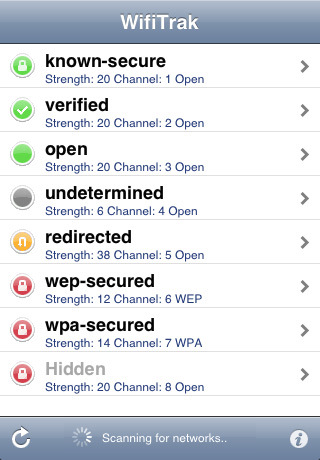
WifiTrak helps you find FREE and open WiFi hotspots and public access points quickly and easily.

WifiTrak scans for all available WiFi devices and networks in the area and tests each network it finds for usability. It shows a list of the Wifi networks sorted from most useable (open, not redirected, strongest signal) to least useable (secured or hidden, weak signal). It can automatically notify and launch mail, a browser, or another application when it finds a suitable network.

FEATURES
* Simple, standard user interface
* Network list sorted from best to worst
* Automatic redirection detection
* Automatic scanner/adjustable scan time
* Ability to set minimum strength
* Choice of notification sounds
* Optional automatic connection action:
Connect
Connect and exit
Connect and Launch Safari
Connect and Launch Mail
Connect and Launch URL
* Detail display with:
MAC Address
Channel
Signal Strength (RSSI)
Noise
Authentication (WEP/WPA/WPA2)

What's new in Version 2.6
3.0 Compatibility
Minor translation corrections

Saturday, May 22, 2010

Quicksheet (Excel Spreadsheets, Email, & WiFi) v1.0.2

Quicksheet (Excel Spreadsheets, Email, & WiFi) v1.0.2 | Read more...
Description
Mobilize Your Spreadsheets.™

The most advanced spreadsheet editor available for iPhone® and iPod® Touch devices.

NEW UPDATE!
• Create, Open & Edit Excel (.XLSX) files for 2007 Windows & 2008 Macintosh

Enjoy superior Microsoft® Excel spreadsheet editing. Easily access email attachments, email or transfer files without MS Exchange®. No desktop client installation required! Edit important spreadsheets with confidence.

Reasons to buy Quicksheet vs. any other solution:
• Fast and responsive app performance
• No desktop client to install. Simple browser file transfer from any computer
• Robust, rich features for power users such as two finger zoom
• No need to purchase MS Exchange® to access or email files
• Very easy to use, intuitive UI. No confusing menus
• Easy access and file sharing
• 100% data integrity. Guaranteed Microsoft compatibility
• Responsive customer service. 24/7 support
• Simply works better!

Quickoffice® Mobile Office Suite also available to purchase in iTunes, which includes both Microsoft Word and Excel edit functionality.

Top-Industry Awards:
• Best Business Application - CTIA Wireless 2009
• Most Innovative Mobile Application - Finalists 2009 Andrew Seybold Choice Awards

Experts Agree:
• “Excel’s handling features are robust and the interface is streamlined. Score: 9/10” - AppCraver.com
• ”Excel functionality is robust...calculate data using a vast library of functions” - Laptopmag.com

Quicksheet® offers 5 powerful products in 1 simple application:
• Edit Excel spreadsheets
• Transfer desktop files via WiFi
• Remotely access MobileMe® iDisk® accounts
• Email files directly via your iPhone
• Mount your iPhone as a drive

Quicksheet® - Advanced Excel® Spreadsheet Editor
• Edit & create Excel spreadsheets
• Copy/paste cells, columns, rows, and cell ranges & formulas dynamically updated
• Access iPhone email attachments from any email program – no need to have MS Exchange
• Full support for Apple 3.0 OS cut/copy/paste across supported apps
• Undo/redo ‘shake’ functionality
• Landscape editing
• Set/remove cell borders
• Edit font type & size
• Edit directly into a cell in portrait view
• Add, rename, delete, & reorder worksheets inside a single spreadsheet
• Set alignment within a cell
• Professional-grade calculation engine
• Supports advanced Excel features
• Simply tap, hold & drag column/row headers to increase/decrease column width/row height
• Extensive formatting; bold, italic, cell background, font color, accounting, currency, decimals, currency symbols
• Double tap on a cell & drag to select a range
• Easily change inputs & recalculate
• Confidently edit with auto-save and auto-restore
• Switch easily between workbook sheets
• Insert new rows/columns
• File support: .XLS/.XLSX (97-2008 Edit)

Includes Quickoffice® Files functionality for remote access, email, WiFi, and file management:
• Email local or remote files without having to download them
• Bookmark last viewed position in non-editable documents (PDF, etc)
• Slideshow viewing of images in remote & local directories
• Mount your iPhone as a wireless drive via WiFi
• Drag and drop files between your iPhone and computer via WiFi
• Remotely access your MobileMe® iDisk® account (separate account required)
• Create new folders on your iDisk account or device to manage digital content
• Save files to your iPhone for offline viewing
• View most common file types
• Easily organize, rename, & move files on your device
• Passcode protection keeps content safe

Visit Quickoffice.com for full technical details.

Requirements: Compatible with iPhone and iPod touch Requires iPhone OS 3.0 or later

Quickoffice Files (Email, Access & WiFi) v2.0.1

Quickoffice Files (Email, Access & WiFi) v2.0.1 | Read more...
Description
Mobilize Your Files.™

Special Promotion for the Next 5,000 Customers!!

NEW! Access iPhone email attachments from any email program – no need to have MS Exchange.

The easiest way to Access, View, and Share files from your iPhone® or iPod® Touch.

Quickoffice has been trusted and used by millions of mobile users in over 180 countries, and is the world’s leading provider of mobile office productivity solutions. Now Quickoffice brings this experience to both the iPhone and iPod Touch. Download Quickoffice Files today and stay connected and in control of your content anytime, anywhere!

Quickoffice® Files is 4 products in 1 simple to use application:
• Remotely access your MobileMe® iDisk® account
• Email files directly from your iPhone
• Transfer files from your Macintosh or PC via WiFi
• Mount your device as a drive via WiFi

Key Product Features

Wi-Fi File Transfer:
• Mount your device as a drive via WiFi for easy file transfer between your iPhone or iPod Touch and your desktop.
• Drag & Drop files via WiFi between your desktop and your device.
• Transfer files between iPhone or iPod Touch and Macintosh or PC
• Passcode protected file transfer for added security
• Easily connect to your iPhone or iPod Touch using Bonjour
• File transfer does not require any desktop software

MobileMe iDisk Access:
• Easily browse iDisk files and folders while on the go
• Download files from iDisk to your iPhone or iPod Touch for offline use
• Upload files from your iPhone or iPod Touch to your iDisk account
• Create new folders, delete, or rename files & folders

Email Files:
• E-mail files regardless of file type (audio, video, zip files,etc.)
• E-mail multiple remote or local files.
• E-mail remote files without having to download them
• Email any file on your iDisk folder directly from the application
• Email address fields integrated with iPhone contacts, making it easier to choose “To/CC/BCC” addressing
• Email is sent securely

File Viewer:
• Slide show viewing of remote and local images
• Smooth scrolling and pinch apart zooming throughout App
• Advanced image viewer for viewing high resolution images
• Supports most file formats (see below for complete list)
• View files in landscape
• Auto-bookmarking your last viewed position in documents

Extensive File Format Support:
Quickoffice Files will list any files without restriction. However, only the following file types can be viewed or played on the device:
• Images: .jpg, .jpeg, .tif, .tiff, .gif, and .svg
• Microsoft Word: .doc and .docx
• Microsoft Excel: .xls and .xlsx
• Microsoft PowerPoint: .ppt and .pptx
• iWork: Pages, Numbers & Keynote
• Adobe Acrobat: .pdf
• Web Pages:.htm and .html
• Web Archive: .mht
• Audio: .mp3

Notes:
• An Apple MobileMe account is NOT necessary to use Quickoffice Files.
• Does not support iWork '09.

Privacy and Security is our Top Priority
• Passcode protection of the entire application keeps your content safe
• Secure personal data - your MobileMe information is NEVER transmitted outside of your MobileMe account

LANGUAGE SUPPORT: English

Visit Quickoffice.com for full technical details.

Requirements: Compatible with iPhone and iPod touch Requires iPhone OS 3.0 or later

Monday, March 29, 2010

WordFu 1.1

WordFu v1.1 | Download
Description
Shake your letter dice and spell as many words as you can before the clock runs out. Build up your score by unleashing an endless word barrage! Freeze time, flick dice for better letters, and let loose a fiery spelling fury! Once you’ve mastered it on your own, take on your friends over WiFi. Dominate the leaderboard on your quest to earn WordFu Belts and become a true WordFu Grand Master. Once no worldly man can defeat you, play Shaolin Style for the highest WordFu challenge!

Created by Demiurge Studios, WordFu (http://wordfu.ngmoco.com) features crisp 3D graphics, wild Kung Fu action and endless wordplay solo or with your friends.

• MULTIPLE MODES OF GAMEPLAY
˙ Play in single-player mode or challenge your
˙ friends’ honor in real-time multiplayer WiFi
˙ battles.

• DYNAMIC KUNG FU ACTION
˙ Rack up your score by shaking and flicking your
˙ iPhone to roll the letter dice and submit your
˙ spelled words.

• UNIQUE, INTERACTIVE ELEMENTS
˙ Harness the power of Fire, Ice, and Wind to
˙ double your score, stop time, and change letters
˙ to spell more words.

• EARN ACHIEVEMENTS AND HIGH SCORES
˙ Enter the Hall of Legend by breaking WordFu
˙ Records, climbing the leaderboard and earning
˙ belts as you strive to become a WordFu Grand Master.

• AUTHENTIC PHYSICS
˙ MachDice technology delivers stunning visual
˙ effects and authentic physics that capture the
˙ look and feel of rolling real dice. Tilt your
˙ iPhone to peek at the other sides of each
˙ die before you change letters.

• AUTHORITATIVE DICTIONARY
˙ WordFu’s dictionary recognizes over two hundred
˙ thousand words for virtually unlimited
˙ replayability.

• SHOWCASES: ACCELEROMETER, TOUCH, VIBRATION, WIFI

Requirements: Compatible with iPhone and iPod touch Requires iPhone OS 2.2 or later

Monday, March 15, 2010

OmniFocus 1.2.2

OmniFocus v1.2.2 | Download
Description
OmniFocus synchronizes wirelessly with OmniFocus for Mac, either locally over Wi-Fi (with pushed updates) or remotely through the cloud (using MobileMe or a WebDAV server). OmniFocus uses calendar notifications to help you remember due dates, even when you're offline!

Want to learn more? Please watch the video on our web site, or try OmniFocus on an iPhone at an Apple Store near you!

Requirements: Compatible with iPhone and iPod touch Requires iPhone OS 3.0 or later

Thursday, February 18, 2010

Memory Stick 1.2

Memory Stick v1.2 | Download
Description
You no longer need to carry around a USB memory stick to copy and share files from one computer to another. Instead, turn your iPhone or iPod Touch into a wifi drive using File Sharing.

File Sharing allows you to easily transfer files to and from your iPhone or iPod Touch over your Wi-Fi connection by accessing it as if it were a drive, from within Windows Explorer or Finder.

If you prefer, you can also upload and download files from your web browser.

What is more, once the files are on your iPhone or iPod Touch, you can view them, making your device a portable file viewer.

File Sharing can view the following file types:

• Microsoft Word (.doc, .docx)
• Microsoft Excel (.xls, .xlsx, .csv)
• Microsoft PowerPoint (.ppt)
• PDF Files (.pdf)
• iWork Pages documents (.pages)
• Safari Web Archives (.webarchive)
• Web Pages (.htm, .html)
• Text Files (.txt, .cpp, .c, .m, .h)
• Graphic Files (.bmp, .gif, .png, .jpg)
• Movie files (.mp4, .mov)

Requirements: Compatible with iPhone and iPod touch Requires iPhone OS 2.0 or later

Sunday, January 31, 2010

Quickoffice Mobile Office Suite 1.4.2

Quickoffice Mobile Office Suite v1.4.2 | Download
Description
If you are a new Quickoffice Customer looking to purchase our leading mobile office productivity suite, rest assured the issues you may have seen reported recently were isolated to a small set of our current customers who upgraded from a previous version and are not related to new purchases.

To our Valued Current Quickoffice Customers, we have now fixed the reported version 1.5.0 upgrade issues and you can expect a version 1.5.1 update available shortly. Please take this into consideration while leaving your reviews of our product. You can also revise reviews if you are happy with the new update forthcoming. We apologize for the inconvenience and thank you for your patience!

You can express any concerns to us on Twitter.com/Quickoffice or Facebook.com/Quickoffice

*Editor’s Choice for Mobile Office Suite – iPhone Life Magazine*
*Best App for Editing Office Documents – O'Reilly App Smackdown*

NEW Updates!
• Password protected file support for Microsoft® Word and Excel
• Quicksheet: Smooth scrolling, Adjust selection
• Quickword: Text underlining, Word count
• Localized in French, German, Italian, Spanish, Japanese and Simplified Chinese

Enjoy superior Microsoft Word and Excel CREATE & EDIT functionality today in a powerful productivity suite! Also – VIEW, EMAIL, and ACCESS attachments with the most popular file formats including PowerPoint, PDF, iWork, HTML, PNG, JPG, GIF, SVG, TIF, MP3, etc.

Top-Industry Awards:
• Best Business Application - CTIA Wireless 2009
• Most Innovative Mobile Application - Finalists 2009 Andrew Seybold Choice Awards

Experts Agree:
• “Top 10 Must-Have iPhone Business Apps” – PC World
• “It's our choice, bar none, for Office functionality on the iPhone” – LAPTOP
• “It has an impressive suite of features” – The Wall Street Journal

Quickoffice® offers 7 powerful products in 1 simple application:
• Create, Open & Edit Word documents
• Create, Open & Edit Excel spreadsheets
• Transfer desktop files via WiFi
• Advanced Notepad Editor
• Remotely Access MobileMe® iDisk® accounts
• Email & Access files directly via iPhone
• Mount your device as a drive via WiFi

Quickword® - Advanced Word Document Processing
• Create, Open & Edit Microsoft Word documents
• Intuitively cut/copy/paste text
• Easy to use double/triple tap for word/paragraph selection
• Extensive text formatting; bold, italics, font sizes, styles
• Auto-correction (predictive text)
• Auto-capitalization
• Double-tap to create a period
• Wrap text at any zoom level eliminates repetitive left/right scrolling
• Adjust indentation level of bulleted/numbered lists, paragraphs
• Find text in docs
• Set paragraph alignment
• Easily view wide tables
• High-fidelity rendering
• Confidently edit with auto-save & auto-restore
• Edit bulleted/numbered lists
• File support: Edit (97-2008) .DOC,.DOCX,.TXT

Quicksheet® - Advanced Excel® Spreadsheet Editor
• Create, Open & Edit Microsoft Excel spreadsheets
• Professional-grade calculation engine
• Supports advanced Excel features
• Copy/paste cells, columns, rows, and cell ranges & formulas are dynamically updated
• Landscape editing
• Set/remove cell borders
• Edit font type & size
• Edit directly into a cell in portrait view
• Add, rename, delete, and reorder worksheets inside a single spreadsheet
• Tap, hold & drag column/row headers to increase/decrease column width/row height
• Extensive formatting; bold, italic, cell background, font color, symbols
• Easily change inputs and recalculate
• Confidently edit with auto-save and auto-restore
• File support: (97-2008) .XLS, .XLSX

Requirements: Compatible with iPhone and iPod touch Requires iPhone OS 3.0 or later

Wednesday, December 9, 2009

90s Greatest 100 Songs of All Time 2.0.0

90s Greatest 100 Songs of All Time v2.0.0 | Download
License: Free
Price: Free

Description
This app plays the full tracks of the greatest music of the 90’s. The songs on this list were chosen and ranked based on their initial and lasting popularity, and their impact on the overall scope of musical history. Disagree with the list? Discuss it at: forums.nutsie.com

Do you remember what song was playing the first time you used the internet? How about when pagers were replaced by mobile phones? What song did you blast on your boom box when you needed to calm your fears about Y2K or cloned sheep?

This app is the perfect conversation starter…break the ice, quiz your friends, or simply reminisce about your grungy style, how many times you performed “the Macarena” at weddings, or that belly button ring you so regret getting.

Requirements
Top 100 '90s Songs requires a connection to a 3G, Edge, or Wi-fi network to stream the music to your iPhone or iPod Touch.
*It plays the music in shuffle mode. Think of it as a radio station that plays the 100 Greatest music of the '90s, only without commercials, and you can skip songs too.

70s Greatest 100 Songs of All Time 2.0.1

70s Greatest 100 Songs of All Time v2.0.1 | Download
License: Free
Price: Free

Description
What are the 100 greatest rock songs that emanated from the 8 track player and permeated the Ford Pinto?

This application plays the full track of the greatest music of the '70s* It's like that FM radio station you wish you had that only played the good stuff.

What's the number one Rock Song of the '70s? View the list and find out.

Hear or see a song you like? Select the "buy song" button and you'll be taken directly to that song in the iTunes store. View related YouTube videos.

Music in the '70s became more diverse, branching out into even more sub-genres -- soft rock, punk, folk rock, country rock . . . and yes, disco.

This list isn't based solely on record sales. This is a list of songs that have stood the test of time to become the 100 Greatest Rock songs of the 70s. The songs in these lists were chosen and ranked based on their initial and lasting popularity, and on their impact on the overall scope of musical history. All these Rock Music songs are crucial to know for full appreciation of the history of Rock 'n' Roll music. These Rock Music songs are meant to be taken as a basic starting point for a greatest songs discussion. If you disagree with (no one agrees on all of these), then go to our forum and let us know (forums.nutsie.com).

Requirements
Top 100 '70s Songs requires a connection to a 3G, Edge, or Wi-fi network to stream the music to your iPhone or iPod Touch.
*It plays the music in shuffle mode. Think of it as a radio station that plays the 100 Greatest '70s Rock, only without commercials.

Tuesday, December 8, 2009

XBLContacts 1.1

XBLContacts v1.1 | Download
License: Free
Price: Free

Description

Do you or your friends have avatars on the Xbox 360? Now you can download them and import the avatar pictures into your contacts. Have their avatar pic come up each time they call!

You don't even need to have an XBox or a live account, just know some the gamertags of your friends!

An internet connection (edge/3G/WiFi) is required to download the images.

After importing, go in and edit the contact picture and then re-save (no need to move it around) to have it appear full screen when a call comes in!

Requirements: Compatible with iPhone and iPod touch Requires iPhone 2.0 Software Update

Sunday, December 6, 2009

PhonoCam 1.0.1

PhonoCam v1.0.1 | Download
License: Free
Price: Free

Description

PhonoCam is a camera application which records sounds from the environment together with a photograph.It records audio for a set amount of time (between 2 seconds to unlimited) until the photograph is captured.

After copying files to iTunes via Wi-Fi, images are displayed as album cover artwork and can be browsed together with sounds using iTunes CoverFlow.

Requirements: Compatible with iPhone Requires iPhone OS 2.1 or later

Sunday, November 22, 2009

Chili Printer v1.0

Chili Printer v1.0 | Download
Description

Phantombility's ChiliPrinter turns IPhone/IPod Touch to be a wireless virtual printer of your PC. You can print anything from your PC and view it later from your IPhone/IPod Touch device even without WIFI connection.

Use Scenarios:
- Print website, photo, cook recipe, driving direction/map, books, and Office documents from your PC to your IPhone/IPod Touch device.
- print ANYthing from your PC. Read all of them offline ANYwhere/ANYtime and with NO additional reader software installed.
- Professional view experience; large view area, jump to page, portrait/landscape view.

How to use:
- PC side
1. Download and install ChiliPrinterServer (Free) software from http://www.phantombility.com/en/prod/chiliprinter/
2. Install the server at the PC side (it will also install a virtual printer in your system).
3. Start the server
4. Do printing from any software running on your PC to Phantom Virtual Printer.

- IPhone/IPod side
1. If an IPhone/IPod touch device is WIFI connected on, the printing job will send to the device instantly.
2. Or, if an IPhone/IPod Touch deice is NOT WIFI connected, the printing job will stay with the PC side server until an IPhone/IPod Touch device is connected.
3. Whiling viewing, tap on 'JumpTo' to goto specific page.

Features:
- Support all Windows OS (XP, Vista, Server).
- One step solution to transfer your PC documents to a IPhone/IPod Touch device

Requirements: Compatible with iPhone and iPod touch Requires iPhone OS 2.0 or later

Tuesday, November 17, 2009

Wi-Fi File Sharing v2.0

Wi-Fi File Sharing v2.0 | Download
Description

Wi-Fi File Sharing lets you use your iPhone or iPod Touch as a wireless hard drive which can be accessed by Wi-Fi from any local Mac or PC web browser with password protection.

All you need to do is type in the given iPhone URL into your web browser, and you are instantly connected for transferring files.

Wi-Fi File Sharing also lets you store thousands of PDF, Word, Excel, PowerPoint, and plain text files on your iPhone for viewing documents, articles, memos, outlines, papers, scripts, and speeches while anywhere.

With Wi-Fi File Sharing, you can experience the freedom of having instant access to thousands of important documents, articles, memos, papers, and notes right in your pocket.

Wi-Fi File Sharing runs on both the iPhone and iPod touch.

Features:

- Advanced easy to use interface
- Download and upload documents from any local Wi-Fi connected web browser
- View multiple PDF, Word, Excel, and PowerPoint documents at the same time
- View multiple JPEG, GIF, PNG, and TIFF photos at the same time
- Ability to play MPEG4 videos (.mp4, .mov, .mpv, .3gp)
- Adjust the saturation, luminosity, temperature, and color balance of any image
- Automatically caches all opened documents for resuming at any time

- On-line user guide with step by step screenshots
- Create an unlimited number of folders and subfolders
- Delete any folder or document by sliding over left to right
- Browse thousands of documents on the iPhone hard disk

- View documents in portrait or landscape mode
- Loads large PDF files with sizes up to 40,000 KB in a few seconds
- Enter full screen mode by double tapping the title bar
- Easily switch between documents by sliding over the title bar
- E-mail any text document instantly
- Works with all international text

- Tap on the "HD" button to display the file's location in the file browser
- Compress or rename a folder by tapping its icon
- Backup thousands of files with the built-in zip compression
- Upload hundreds of files at a time with zip uncompress

Requirements: Compatible with iPhone and iPod touch Requires iPhone OS 3.0 or later

Sunday, November 15, 2009

Wi-Fi Text Editor v2.0

Wi-Fi Text Editor v2.0 | Download
License: Free
Price: Free

Description

Wi-Fi Text Editor 2.0 is an easy-to-use iPhone plain text editor for writing articles, memos, outlines, papers, scripts, and speeches while anywhere. It also provides the capability for storing thousands of PDF, Word, Excel, PowerPoint, JPEG, MPEG4, and plain text files on the iPhone in a hierarchical folder system for mobile class notes, meeting notes, photos, videos, reminders, and bibliography.

Wi-Fi Text Editor also includes a built-in Wi-Fi web server for viewing, downloading, or uploading files from any local Mac or PC web browser with password protection. All you need to do is type in the given iPhone URL into your web browser, and you are instantly connected for viewing or transferring files.

With Wi-Fi Text Editor, you can experience the freedom of having instant access to thousands of important articles, memos, papers, photos, videos, and notes right in your pocket.

Wi-Fi Text Editor 2.0 runs on both the iPhone and iPod touch.

Features:

- Advanced easy-to-use interface
- View and edit multiple plain text files at the same time
- View multiple PDF, Word, Excel, and PowerPoint documents at the same time
- View multiple JPEG, GIF, PNG, and TIFF files at the same time
- Ability to play MPEG4 videos (.mp4, .mov, .mpv, .3gp)
- Automatically caches all opened documents for resuming at any time

- On-line user guide with step by step screenshots
- Create an unlimited number of folders and subfolders
- Delete any folder or document by sliding over left to right
- Browse thousands of documents on the iPhone hard disk
- Download and upload documents with the built-in Wi-Fi web server

- Edit text in portrait or landscape mode
- Loads large PDF files with sizes up to 40,000 KB in a few seconds
- Enter full screen mode by double tapping the title bar
- Easily switch between documents by sliding over the title bar
- E-mail any plain text document instantly
- Works with all international text

- Compress or rename a folder by tapping its icon
- Backup thousands of files with the built-in zip compression
- Upload hundreds of files at a time with zip uncompress

Included Sample Documents:

- Bill of Rights
- Declaration of Independence
- Gettysburg Address
- Sample Beach Photos
- Sample Excel Spreadsheet
- Sample PowerPoint Presentation
- Sample PDF Research Paper
- Sample Word Document

Included Sample Folders:

- Documents (Articles, Memos, Outlines, Papers, Scripts, Speeches)
- Bibliography (Anthology, Articles, Books, Dissertations, Interviews, Journals, Periodicals, Research Papers)
- Class Notes (Arts, Business, Economics, Education, Engineering, Government, History, Language, Law, Math, Medicine, Philosophy, Public Service, Science)
- Meeting Notes (Accounting, Board of Directors, Customer Service, Finance, Human Resources, Information Technology, Management, Marketing, Operations, Production, Public Relations, Purchasing, Research and Development, Sales)
- Reminders (Birthdays, Favorite Books, Gifts, Shopping Lists, To Do Lists, Upcoming Events)

Requirements: Compatible with iPhone and iPod touch Requires iPhone 2.2.1 Software Update

Wednesday, September 2, 2009

iAirport Wifi 1.0

Description
iAirport Wifi is a complete database of over 10,000+ airports all over the world which tells you which airport has FREE wifi. You can quickly search the airports by the IATA code or by the name of the airport. The search is smart that if you are unsure of the name, it will filter out the list to help you find what you are looking for.

Requirements
Compatible with iPhone and iPod touch